Performance & Optimisation
Fixing Alt-Tab:
By default you will not be able to Alt-Tab in Fullscreen Mode! In order to solve this you either need to install DXVK and/or run the game in Windowed Mode.
In general, you should try to install DXVK as it will fix your Alt-Tabbing issues and typically improves performance. However, the installation and compatiblity depends entirely on your hardware. Read DXVK for more information including installation and configuration.
If you are not able to use DXVK!
In this case you will need to run the game in windowed mode. The below steps will give you the optimal experience:
- Go into falloutcustom.ini and change bFull Screen to
0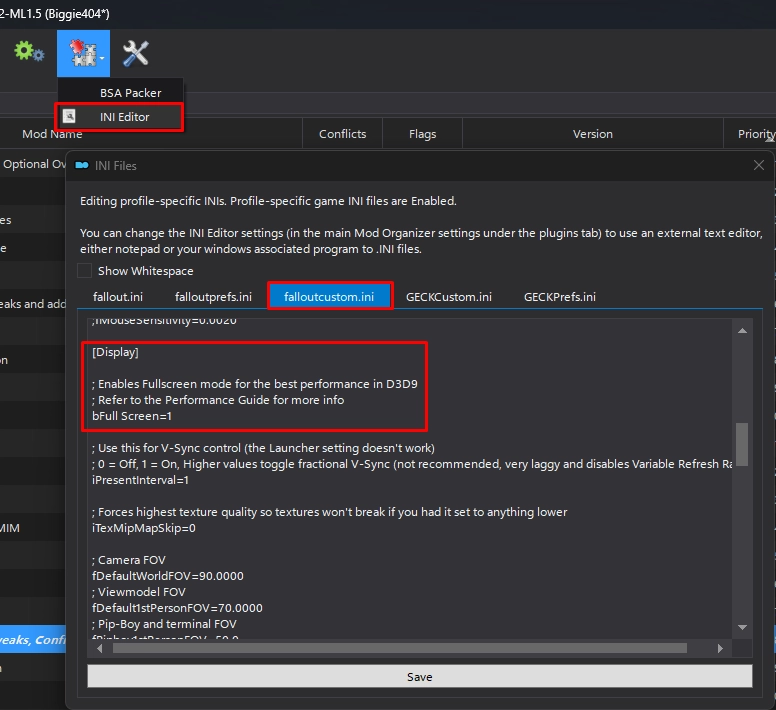
- Enable the OneTweak mod in the left pane of MO2 under the Tweaks, Configs & Patches separator.
- Enable the NVTF - Windowed (D3D9 Patch) mod in the left pane of MO2 under the Tweaks, Configs & Patches separator.
FPS Limiting:
It is extremely important that your fps is capped to 120 or less. At framerates higher than this you can expect some weirdness but more importantly this can cause crashes! Read Recommended Limiters for more information.
MO2 Performance Profile:
You can select the Mojave Express Wabbajack - Performance Preset if you need some extra fps.

This preset does the following:
- Disables the Vanilla Plus AO mod
- Disables the Vanilla Terrain Parallaxed mod
- Disables the Vanilla Objects Parallaxed mod
- Disables the Weapon blur and DOF effects mod
- Disables the Afterglow mod
- Disabled the Smooth Terrain mod
- Disables NPC shadows
- Enables B42 Optics - Performance Preset
- Enables MEW - Performance INI's
- Slightly reduces various LOD distances